MGx8Loggerv0.9.2

MGx8 Logger records live engine data over ENET or an MHD Wi-Fi adapter, with a log viewer, a road dyno and a drag timer.

$19 USD

Tax is added at checkout.

Download
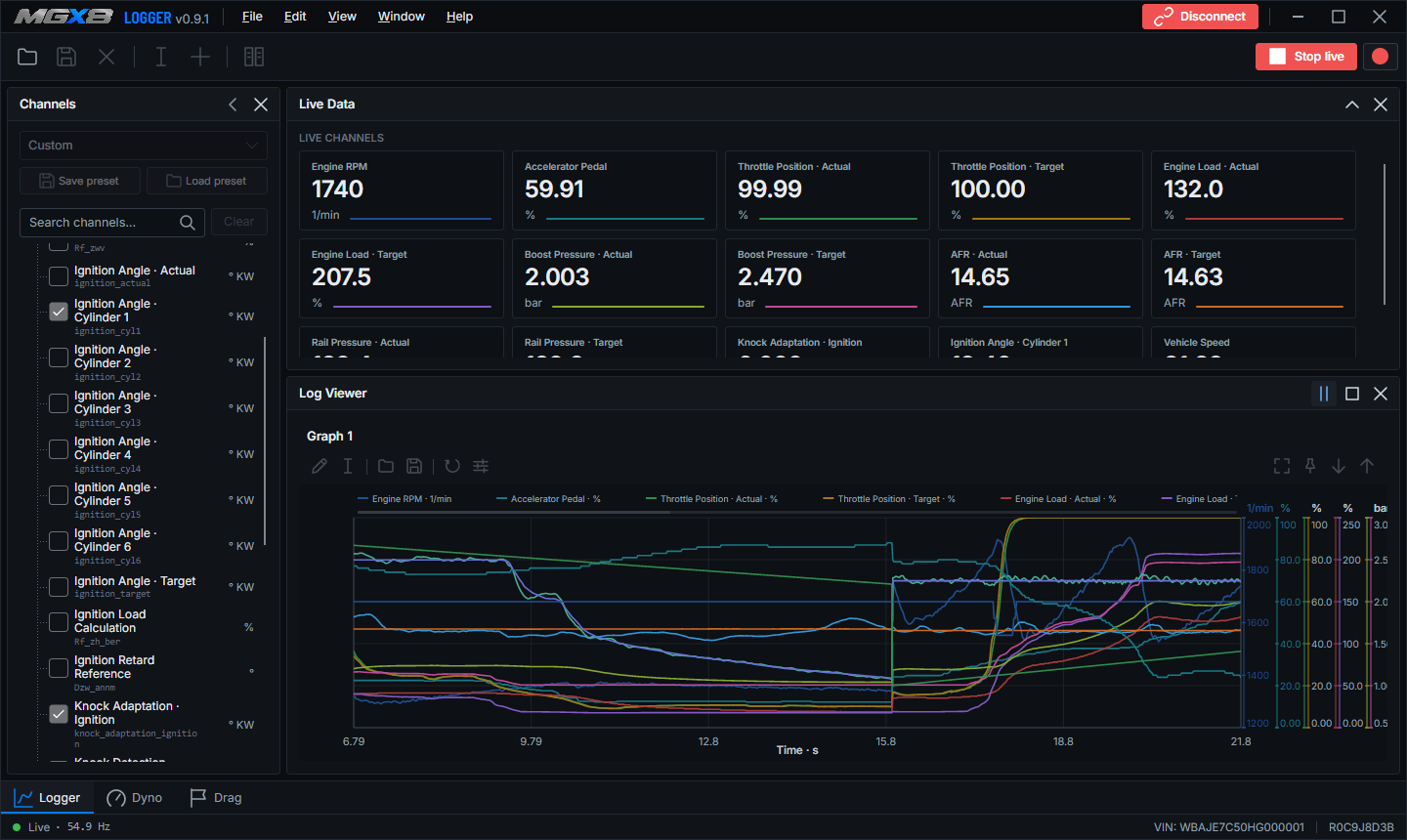
MGx8 Logger with live channels and the log viewer

Free to downloadSaved runs open without a license. A license connects Logger to a car.

Up to 40 channels at 50 HzChoose from more than 50 channels.

Windows 10 or laterWith an ENET cable or an MHD Wi-Fi adapter.

Record and analyze

Logger shows what the engine does while you drive, records it, and gives you the tools to read the result. A license connects it to a car for live data. Saved logs, Dyno runs and Drag runs open without one.

Live data

Choose from more than 50 channels and watch up to 40 of them at once, refreshed up to 50 times a second.

  • Start live data and recording separately, so you can watch without saving
  • Save a channel selection as a preset and load it again
  • Metric or imperial units, lambda or AFR, PS, kW or HP
  • Recordings are plain CSV files that open in Log Viewer or in other tools
Log Viewer

Replay a log on one timeline. Stack several graphs with up to five channels each, then zoom, pan and place a cursor. Channels that measure the same thing, like boost actual and boost target, share one scale, so you can see how far apart they are.

  • Select a range to see its length, how every channel changed, and its minimum, maximum and average
  • Overlay a second log to compare two runs
  • Error channels show target minus actual, as a value or in percent
  • Pin notes to a moment or to a range
  • Save and reopen your graph layout
  • Export a range as CSV or a graph as a PNG picture

Finding pulls

Logger scans a log for full-throttle pulls on its own. It looks at the pedal, RPM, speed, load, boost and gear, and marks every pull on the timeline, so you can jump from pull to pull. Analyze pull then sums one up and points out where boost, rail pressure or the throttle strayed from their targets.

The flags are a hint to look closer, not a safety limit.

Road dyno

Do a full-throttle pull and Logger estimates power and torque from the car's own data: RPM, speed, gear, pedal and the barometric pressure from the ECU. You enter the mass, drag and drivetrain loss of the car, and the result is corrected for the temperature, pressure and humidity of the air.

  • Curves of wheel power, engine power and torque, with the peaks marked
  • Add more ECU channels to a run and study them in Log Viewer
  • Overlay a second run to see what a change did
  • Save a run and open it again later

It is an estimate. Always check the result against a certified dyno.

Drag timer

Arm a run, launch, and Logger times it from the speed signal of the ECU. Pick 0 to 100, 100 to 200 or 200 to 300 km/h, the quarter mile, or the mph runs 0 to 60, 60 to 130 and 130 to 190.

  • A split time every 10 km/h or mph, and a mark at every gear change
  • Calibrate the speed signal against GPS readings and keep the profile
  • Air temperature, humidity and altitude are stored with the run
  • Runs are saved with their telemetry, and you can overlay two of them

Details

Version
0.9.2
Size
78 MB
Requires
Windows 10 or later, and an internet connection for activation, license checks and updates
Connection
ENET cable or MHD Wi-Fi adapter
Supported
BMW B38, B48, B58, S58, N63 and S63 engines
Single VIN, $19
Locks to one vehicle on first activation.
Unlimited VIN, $49
Any number of vehicles on one computer.
Download
Free. A license connects Logger to a vehicle

Questions about Logger

Can I use Logger without a license?

Yes. Logger loads saved runs in Log Viewer, Dyno and Drag for free. A license connects it to a vehicle.

Which cars are supported?

BMW B38, B48, B58, S58, N63 and S63 engines. Support depends on the exact engine, ECU and configuration, so check the supported vehicles first.

Does it work with MHD?

Yes. An MHD tune does not affect MGx8 Logger compatibility.

Can I use a normal ENET cable?

Yes. A standard ENET cable works fine.