
MGx8HU Toolv0.1.0

Activate Apple CarPlay, install Android Auto and the MGx8 Logger and xDrive app on compatible BMW NBT EVO ID5/ID6 head units over ENET.

Single VIN

$49 USD

Tax is added at checkout.

Download
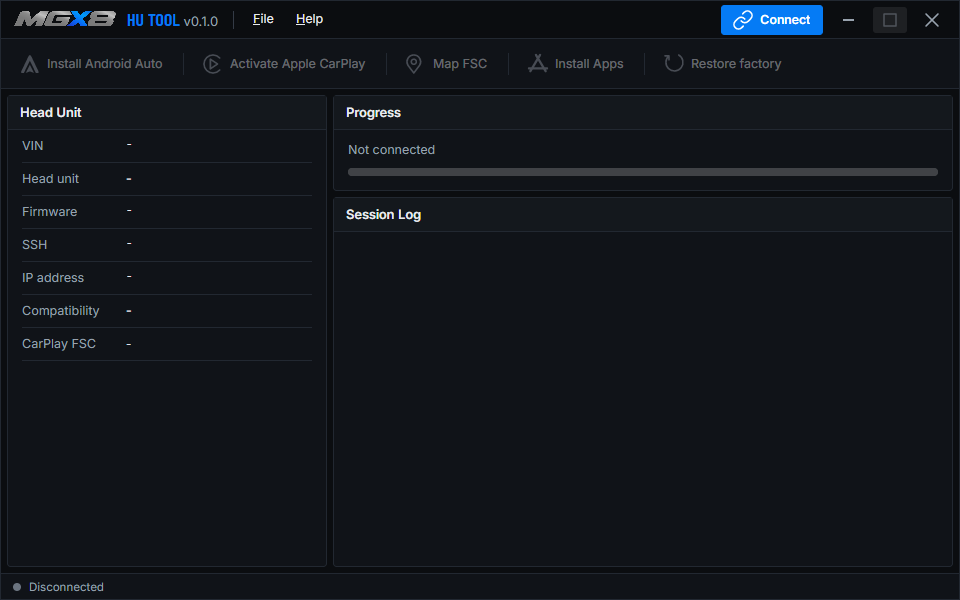
MGx8 HU Tool showing head unit details, progress and the session log

Free featuresAndroid Auto, iDrive apps and factory restore.

BMW NBT EVO ID5/ID6 head unitsCompatibility is checked for each operation.

Windows 10 or laterWith an ENET cable.

What you can do with HU Tool

Use your phone on the iDrive screen, activate a navigation map for your region, or see live engine data without opening a laptop in the car. Check your head unit and firmware before buying a license.

Check your BMW

Connect your Windows PC with an ENET cable and turn on the ignition. The Head Unit panel shows your VIN, head unit model and firmware version, along with the compatibility result. You can check those details with the free download before deciding which features you want to use.

  • For compatible BMW NBT EVO ID5/ID6 head units
  • Feature availability depends on your firmware and, for the iDrive apps, the vehicle

Android Auto

Use your Android phone for navigation, music, calls and voice commands on the iDrive screen. After installation, Android Auto is available under Media/Radio. If your phone was already paired with the car, you may need to pair it again over Bluetooth.

  • Free to install on a compatible head unit
  • Works with Android Auto apps such as Google Maps and Waze

Apple CarPlay

Use Apple Maps, music, calls and Siri through native BMW CarPlay. Full-screen CarPlay is available on supported software, with a layout that fits the resolution of your iDrive display. Some firmware versions require manual coding to finish setting up CarPlay.

  • Included in the Single VIN license
  • Existing BMW feature licenses that can be read are preserved during activation

Navigation Map FSC

Use the Map FSC feature to activate the region you need for the built-in BMW navigation. The FSC is the activation code for that map region. Choose from the supported regions or install an original BMW FSC file that belongs to your VIN.

  • Works independently of Apple CarPlay
  • Included in the Single VIN license

Logger for iDrive

See engine speed, boost, fuel rail pressure and air-fuel readings live on the iDrive screen. Boost, rail pressure and lambda show both the target and actual values, so you can see how the engine is responding. The display also shows the current transmission gear.

  • Coolant, intake-air and oil temperatures
  • Free to install through Install Apps

xDrive for iDrive

Switch a supported xDrive BMW to rear-wheel drive from iDrive. Drive mode changes are available while the car is parked, with the ignition on and the engine off. Depending on the vehicle, you can restore all-wheel drive in the app or by cycling the ignition.

  • Available for BMW NBT EVO ID6 on supported vehicles
  • Free to install through Install Apps

Factory restore

Use Factory Restore to remove Android Auto and its installation changes. If a factory backup is available from a previous MGx8 CarPlay or Map FSC activation, you can also bring back the original head unit coding and BMW feature licenses. The backup is stored on the head unit.

  • Free to use without a Single VIN license
  • Keep the ignition on and the ENET cable connected until the restore finishes

Details

Version
0.1.0
Size
46 MB
Requires
Windows 10 or later, and an internet connection
Connection
ENET cable
Supported
BMW NBT EVO ID5/ID6 head units
Firmware
Compatible with NBTEvo_P / Q / R / S / T / U / W / V / X / Y
Single VIN, $49
Locks to one vehicle during first activation.
Download
Free download for Windows 10 or later

Questions about Tool

Do I need a license?

Android Auto, Logger, xDrive and Factory Restore are free. A Single VIN license includes both Apple CarPlay and Map FSC for one vehicle.

Can I check compatibility before buying?

Yes. Connect to the car with the free download and check the head unit and firmware in the Head Unit panel.

Can I get full-screen CarPlay?

Full-screen mode is available on supported head unit software. Some units require manual coding to complete CarPlay setup.

Can I use Map FSC on its own?

Yes. You can activate a supported regional map for built-in BMW navigation independently of Apple CarPlay.